Lagu for Mac

A Plex music player
for the Mac.

Lagu for Mac plays the music library on your Plex Media Server with the full desktop player: lossless playback, the equalizer, downloads, and network speakers. It keeps macOS’s own window buttons, lives in the menu bar when you close it, and costs nothing, now or at launch.

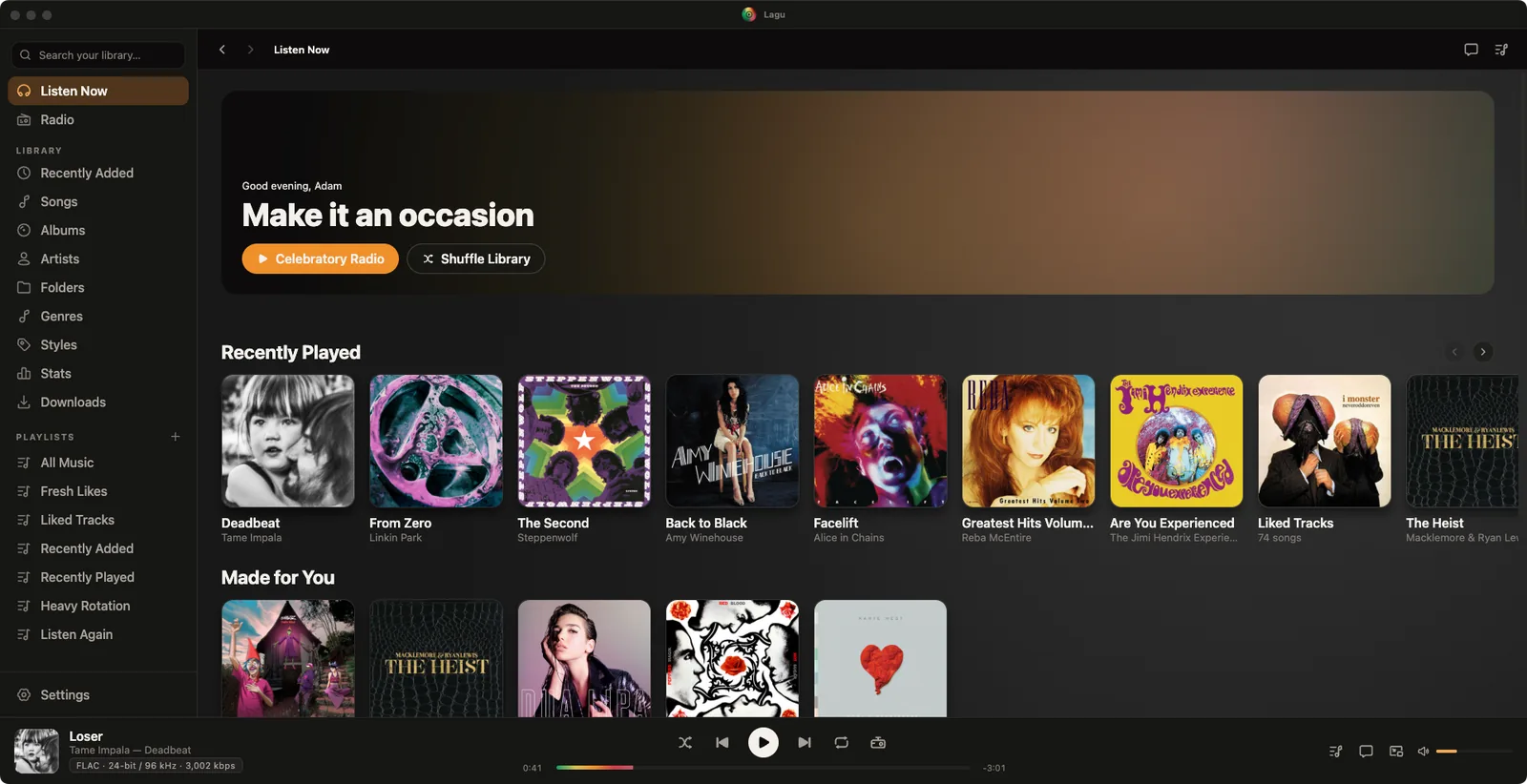
Lagu on macOS with the traffic lights in the title bar: a sidebar with Listen Now, Radio, the library sections including Folders and Stats, and playlists; Home with a Make it an occasion greeting, Recently Played and Made for You rows; and a player bar showing Loser by Tame Impala in FLAC 24-bit / 96 kHz.

01 · On the Mac

At home
in macOS.

Open the disk image, drag Lagu to Applications, and sign in through Plex’s own page in your browser. The app is signed and notarized, so it opens without a trip to System Settings.

Menu bar and Dock

Close the window and the music keeps playing from the menu bar, whose icon tints with the system. Its menu has play, pause, skip, and Game Mode, which stills the color animation and visualizers while a game needs the GPU. Clicking the Dock icon brings the window back.
Media keys and Now Playing

The keyboard’s media keys work with Lagu in the background, and the Now Playing module in Control Center shows the track and art.

A mini-player that floats

A slim bar, or a square of artwork with the controls under it, kept above your other windows. It remembers its shape and where you left it.

Spotlight search

Press ⌘K from anywhere in the app for one overlay over artists, albums, and songs.

Pick the output

Settings, Playback, Output lists every audio device on the Mac. Lagu remembers a DAC or headphones and switches back when they are plugged in again.

Downloads where you want them

Keep albums and playlists on the Mac for a flight, in a folder you choose, on an external drive if you like.

02 · Sound and the rest

The full desktop
player.

Lossless and gapless

FLAC direct-plays from your server with the codec, bit depth, and sample rate on Now Playing, and albums play without gaps.

Ten-band EQ

A preamp, twelve presets, and a custom curve, kept between launches.

Network speakers

Switch on Network speakers in Settings, Playback, then play to a WiiM or another DLNA speaker, set its volume, and seek while it plays, even when the Plex server is away from home.

Visualizers

Six of them, in the colors of the album that is playing, with a fullscreen mode.

Crossfade and lyrics

Crossfade between tracks, loudness leveling on tracks your server has analyzed, synced lyrics, and radio with Sonic Adventure and a Guest DJ.

Scrobbling and Discord

Last.fm and ListenBrainz, and Discord Rich Presence showing what is playing, with the cover when it can find one. All off until you turn them on.

LAGU REMOTE

A phone runs the Mac across the room.

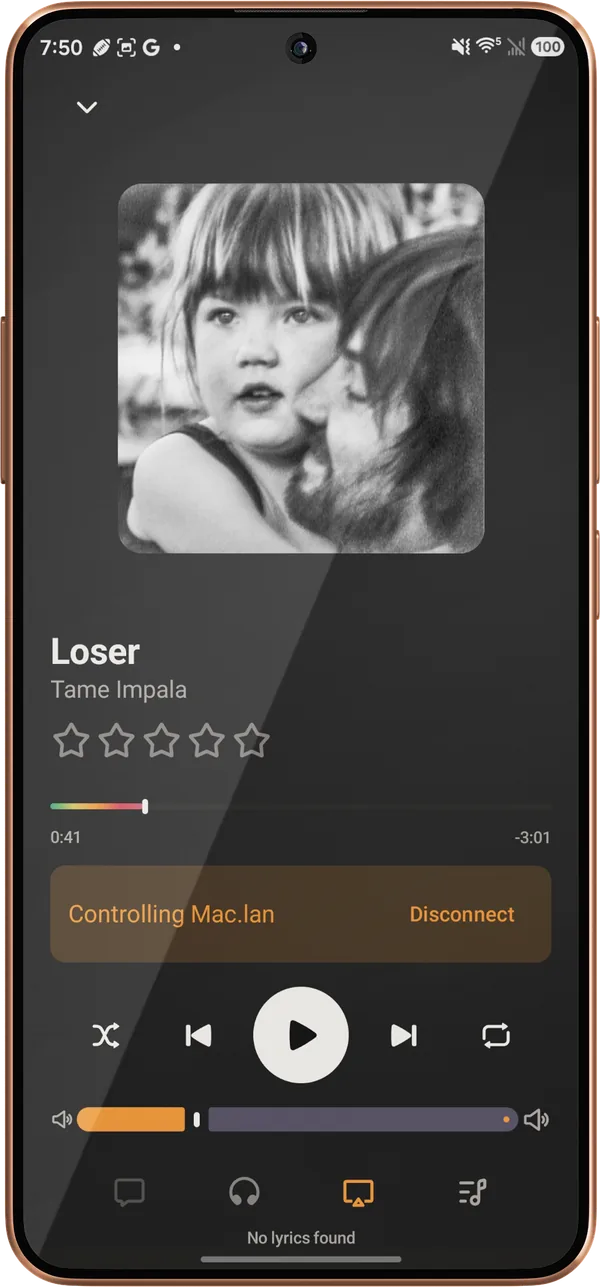
Turn on Lagu Remote in Settings and the Mac is a Remote host whenever Lagu is open, even just in the menu bar. Pair an iPhone or an Android phone with a QR code and it can browse, search, queue, seek, and set Lagu’s volume on the Mac over your own network. The same sheet moves playback from the phone to the Mac and back again.

Lagu on an Android phone controlling a Mac: the cover of Tame Impala’s Deadbeat, the track Loser, the rainbow seek bar, a banner reading Controlling Mac.lan with a Disconnect button, transport controls, and the volume slider.

What it doesn’t do

The gaps,
listed.

What the Mac build does not have yet. The platform table has every feature, cell by cell.

Apple silicon only

The beta ships for M-series Macs. There is no Intel build yet; if you need one, say so on the forum.

One theme, for now

Desktop runs the dark Bloom theme. A light mode comes with the desktop reskin in 0.15.0.

The queue starts fresh

On phones the queue comes back after a restart. On desktop it does not yet.

One streaming-quality setting

Phones split quality between Wi-Fi and cellular. The Mac has one setting.

Getting it

From the beta list
to music playing.

Join the beta list

Pick macOS on the signup form. Desktop invitations arrive by email with a download link.

Install from the disk image

Open the .dmg and drag Lagu to Applications. Later versions install from inside the app, after you say yes.

Sign in with Plex

Lagu opens Plex’s sign-in page in your browser. Approve it, pick your server, and the library loads.

Questions

Asked about
this platform.

Is there a Plex music player for Mac?

Yes. Lagu is a music player for Plex with a desktop app for macOS, Windows, and Linux. On the Mac it plays lossless and gapless, has a ten-band EQ, offline downloads, network speakers, a floating mini-player, and media-key support.

Does Lagu run on Intel Macs?

Not in the beta. The Mac build is for Apple silicon (M-series) Macs. If an Intel build would decide it for you, say so on the forum.

Is Lagu for Mac free?

Yes. The desktop app is free forever on macOS, Windows, and Linux. Only the mobile apps carry a price, $1.99 once, and there is no subscription.

Does Lagu for Mac need Plex Pass?

No. Playback, downloads, the EQ, network speakers, and Lagu Remote work without it. Sonic radio, moods, and Plex-fetched lyrics rely on Plex Pass on the server, as they do in any Plex client.

Can I control Lagu on my Mac from my iPhone?

Yes. Lagu Remote pairs an iPhone or Android phone with the Mac over your own network, with no cloud service in between. The phone can browse, queue, seek, and set Lagu’s volume, and move playback between the two.

Lagu on other screens: iPhone · iPad · Apple Watch · Apple TV · Android · Android TV · Windows · Linux · every feature

Bring your library along.

The closed beta is open and free while it runs, on Android while places last. Invitations go out from the list in waves.

Join the beta list